> ## Documentation Index
> Fetch the complete documentation index at: https://docs.insecureweb.com/llms.txt
> Use this file to discover all available pages before exploring further.
# Collectors
> The new **Collector Management** view allows users to manage installed collectors. This functionality is designed to improve the monitoring and control of collectors within the network.
## Data Sources Menu
 **The latest update introduces** enhanced functionalities within the **"Data Sources"** menu, specifically under the **"Collectors"** and **"Collectors Groups"** sections. These new features are designed to streamline the management and organization of data collectors and their groups.
## Collectors
**Collector Management View:**
* This new view allows users to efficiently manage installed collectors. Users can view, edit, and update collector configurations directly through this interface.
**The latest update introduces** enhanced functionalities within the **"Data Sources"** menu, specifically under the **"Collectors"** and **"Collectors Groups"** sections. These new features are designed to streamline the management and organization of data collectors and their groups.
## Collectors
**Collector Management View:**
* This new view allows users to efficiently manage installed collectors. Users can view, edit, and update collector configurations directly through this interface.
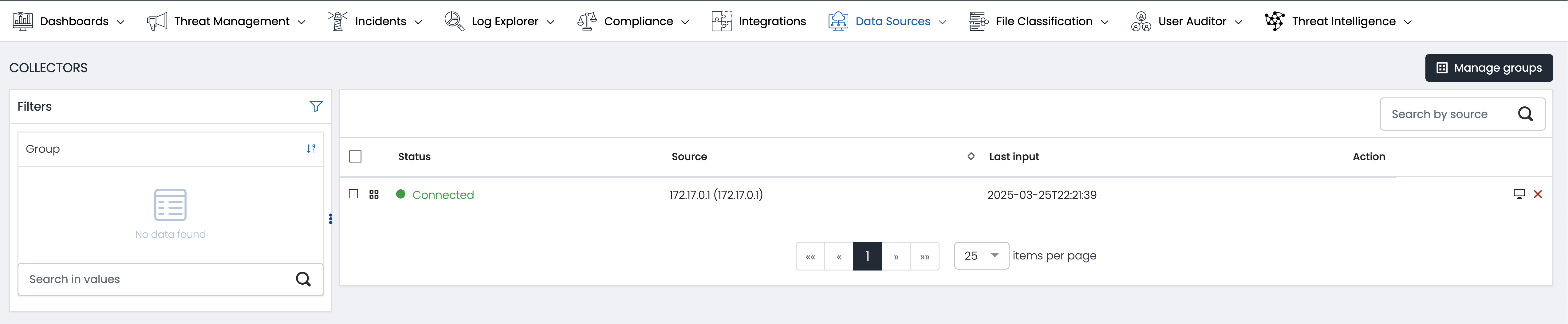 ### Group assignment
Allows users to assign collectors to different groups for organized management.
### Steps to use this feature:
Select the desired collectors.
1. Choose a group from the dropdown list.
2. Confirm the assignment.
3. Filtering by Names
### Filtering by Names
Facilitates the search for specific collectors using a name filtering system.
1. Enter the name of the collector in the search field.
2. The results will automatically update to show only the collectors that match.
### View Collector details
Allows viewing detailed information about each collector.
1. Click on the desired collector.
2. A window will display all the relevant details.
### Deletion of collectors
Offers the option to delete collectors that are no longer needed.
### Collector Groups
### Group assignment
Allows users to assign collectors to different groups for organized management.
### Steps to use this feature:
Select the desired collectors.
1. Choose a group from the dropdown list.
2. Confirm the assignment.
3. Filtering by Names
### Filtering by Names
Facilitates the search for specific collectors using a name filtering system.
1. Enter the name of the collector in the search field.
2. The results will automatically update to show only the collectors that match.
### View Collector details
Allows viewing detailed information about each collector.
1. Click on the desired collector.
2. A window will display all the relevant details.
### Deletion of collectors
Offers the option to delete collectors that are no longer needed.
### Collector Groups
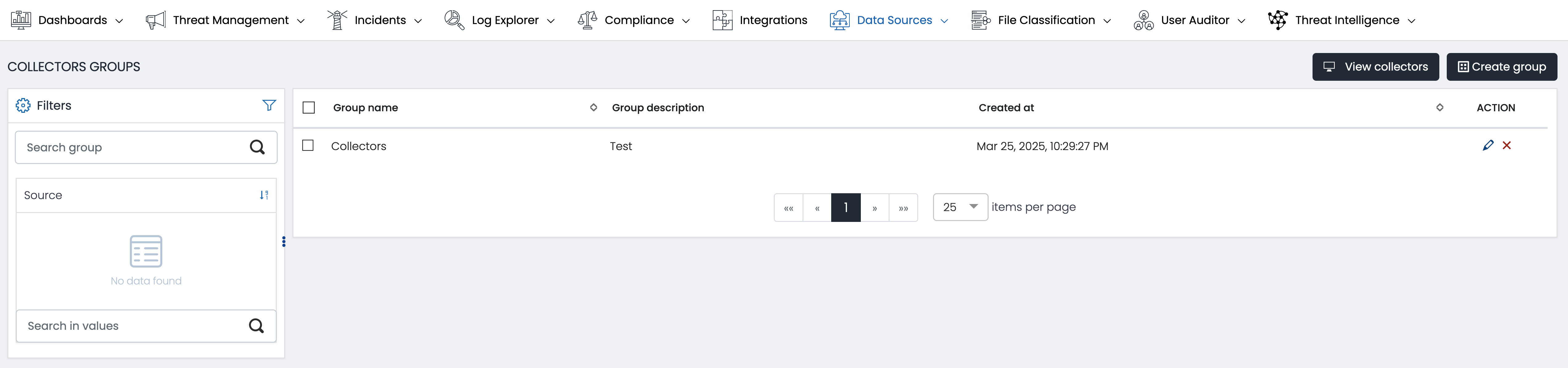 **Group Management Tools:**
* Users can now create, modify, and manage groups of collectors. This functionality aids in organizing collectors according to different criteria or operational needs, enhancing overall network management.
**Group Management Tools:**
* Users can now create, modify, and manage groups of collectors. This functionality aids in organizing collectors according to different criteria or operational needs, enhancing overall network management.