> ## Documentation Index
> Fetch the complete documentation index at: https://docs.insecureweb.com/llms.txt
> Use this file to discover all available pages before exploring further.
# Integration guide for Kibana
> Kibana is a data visualization and exploration tool used for log and time-series analytics, application monitoring, and operational intelligence use cases. It offers powerful and easy-to-use features such as histograms, line graphs, pie charts, heat maps, and built-in geospatial support.
This integration requires a UTMStack agent to work properly. Please, make sure you have installed it before you continue.
> Kibana is a free and open user interface that lets you visualize your Elasticsearch data and navigate the Elastic Stack. Do anything from tracking query load to understanding the way requests flow through your apps.
### 1. Enable Filebeat module
> Linux
```
cd /opt/utmstack-linux-agent/beats/filebeat/ && ./filebeat modules enable kibana
```
> Windows
```
cd "C:\Program Files\UTMStack\UTMStack Agent\beats\filebeat\" && filebeat modules enable kibana
```
### 2. Configure Filebeat module
> Configure the module configuration file according to the image below. You can find it in the path:
> Linux
```
/opt/utmstack-linux-agent/beats/filebeat/modules.d/kibana.yml
```
> Windows
```
C:\Program Files\UTMStack\UTMStack Agent\beats\filebeat\modules.d\kibana.yml
```
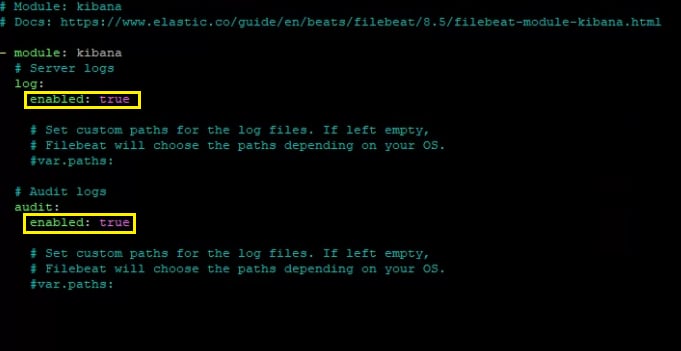 Important!! After a Filebeat module is enabled, the service needs to be restarted using the following command:
> Linux
```
sudo systemctl restart UTMStackModulesLogsCollector
```
> Windows
```
sc stop UTMStackModulesLogsCollector && timeout /t 5 && sc start UTMStackModulesLogsCollector
```
Depending on how you’ve installed Filebeat, you might see errors related to file ownership or permissions when you try to run Filebeat modules. See [Config File Ownership and Permissions](https://www.elastic.co/guide/en/beats/libbeat/8.5/config-file-permissions.html)
### 3. Click on the button shown below, to activate the UTMStack features related to this integration
In order to this integration work properly, you must configure the kibana logs and audit logs appender, to generate logs in **`json`** format. For more information visit: [Logging configuration](https://www.elastic.co/guide/en/kibana/8.5/logging-configuration.html) and [Audit logs](https://www.elastic.co/guide/en/kibana/8.5/xpack-security-audit-logging.html)
Important!! After a Filebeat module is enabled, the service needs to be restarted using the following command:
> Linux
```
sudo systemctl restart UTMStackModulesLogsCollector
```
> Windows
```
sc stop UTMStackModulesLogsCollector && timeout /t 5 && sc start UTMStackModulesLogsCollector
```
Depending on how you’ve installed Filebeat, you might see errors related to file ownership or permissions when you try to run Filebeat modules. See [Config File Ownership and Permissions](https://www.elastic.co/guide/en/beats/libbeat/8.5/config-file-permissions.html)
### 3. Click on the button shown below, to activate the UTMStack features related to this integration
In order to this integration work properly, you must configure the kibana logs and audit logs appender, to generate logs in **`json`** format. For more information visit: [Logging configuration](https://www.elastic.co/guide/en/kibana/8.5/logging-configuration.html) and [Audit logs](https://www.elastic.co/guide/en/kibana/8.5/xpack-security-audit-logging.html)