> ## Documentation Index
> Fetch the complete documentation index at: https://docs.insecureweb.com/llms.txt
> Use this file to discover all available pages before exploring further.
# Integration guide for Apache2
> HTTPD - Apache2 Web Server. Apache is the most commonly used Web server on Linux systems. Web servers are used to serve Web pages requested by client computers.
This integration requires a UTMStack agent to work properly. Please, make sure you have installed it before you continue.
> The Apache2 HTTP Server Project is an effort to develop and maintain an open-source HTTP server for modern operating systems including UNIX and Windows. The goal of this project is to provide a secure, efficient and extensible server that provides HTTP services in sync with the current HTTP standards.
### 1. Enable Filebeat module
> Linux
```
cd /opt/utmstack-linux-agent/beats/filebeat/ && ./filebeat modules enable apache
```
> Windows
```
cd "C:\Program Files\UTMStack\UTMStack Agent\beats\filebeat\" && filebeat modules enable apache
```
### 2. Configure Filebeat module
> Configure the module configuration file according to the image below. You can find it in the path:
> Linux
```
/opt/utmstack-linux-agent/beats/filebeat/modules.d/apache.yml
```
> Windows
```
C:\Program Files\UTMStack\UTMStack Agent\beats\filebeat\modules.d\apache.yml
```
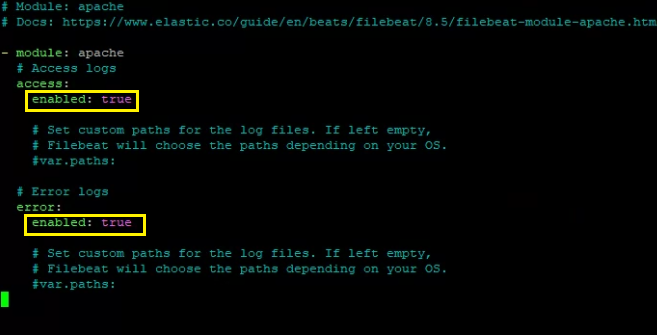 Important!! After a Filebeat module is enabled, the service needs to be restarted using the following command:
### 3. Click on the button shown below, to activate the UTMStack features related to this integration
Important!! After a Filebeat module is enabled, the service needs to be restarted using the following command:
### 3. Click on the button shown below, to activate the UTMStack features related to this integration