> ## Documentation Index
> Fetch the complete documentation index at: https://docs.insecureweb.com/llms.txt
> Use this file to discover all available pages before exploring further.
# Integration guide for Internet Information Services
> Internet Information Services (IIS) is a flexible, general-purpose web server from Microsoft that runs on Windows systems to serve requested HTML pages or files. An IIS web server accepts requests from remote client computers and returns the appropirate response.
## Configuring IIS module in Filebeat
This integration requires the UTMStack Windows agent to work properly. Please, make sure you have installed it before you continue.
> The IIS module parses access and error logs created by the Internet Information Services (IIS) HTTP server.
## Compatibility
> The IIS module parses access and error logs created by the Internet Information Services (IIS) HTTP server. This module works only on Windows.
### 1. Enable IIS module
```
cd "C:\Program Files\UTMStack\UTMStack Agent\beats\filebeat\" && filebeat modules enable iis
```
### 2. Configure IIS module
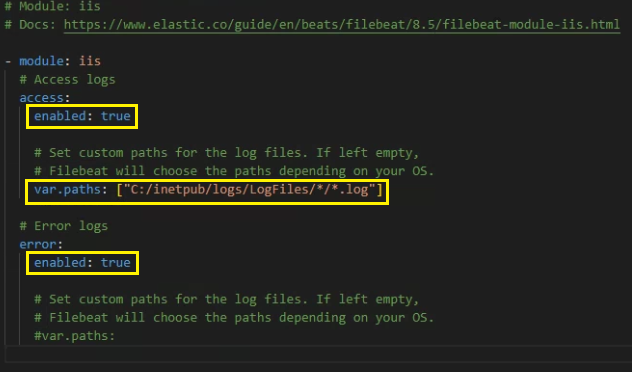
> Configure the module configuration file according to the image below. You can find it in the path:
```
C:\Program Files\UTMStack\UTMStack Agent\beats\filebeat\modules.d\iis.yml
```
 Important!! After a Filebeat module is enabled, the service needs to be restarted using the following command:
```
sc stop ModulesLogsCollector && timeout /t 5 && sc start ModulesLogsCollector
```
### 3. Click on the button shown below, to activate the UTMStack features related to this integration
Important!! After a Filebeat module is enabled, the service needs to be restarted using the following command:
```
sc stop ModulesLogsCollector && timeout /t 5 && sc start ModulesLogsCollector
```
### 3. Click on the button shown below, to activate the UTMStack features related to this integration