> ## Documentation Index
> Fetch the complete documentation index at: https://docs.insecureweb.com/llms.txt
> Use this file to discover all available pages before exploring further.
# Integration guide for Logstash
> Logstash is a light-weight, open-source, server-side data processing pipeline that allows you to collect data from a variety of sources, transform it on the fly, and send it to your desired destination. It is most often used as a data pipeline for Elasticsearch, an open-source analytics and search engine.
This integration requires a UTMStack agent to work properly. Please, make sure you have installed it before you continue.
> Logstash is a free and open server-side data processing pipeline that ingests data from a multitude of sources, transforms it, and then sends it to your favorite "stash."
> Logstash dynamically ingests, transforms, and ships your data regardless of format or complexity. Derive structure from unstructured data with grok, decipher geo coordinates from IP addresses, anonymize or exclude sensitive fields, and ease overall processing.
### 1. Enable Filebeat module
> Linux
```
cd /opt/utmstack-linux-agent/beats/filebeat/ && ./filebeat modules enable logstash
```
> Windows
```
cd "C:\Program Files\UTMStack\UTMStack Agent\beats\filebeat\" && filebeat modules enable logstash
```
### 2. Configure Filebeat module
> Configure the module configuration file according to the image below. You can find it in the path:
> Linux
```
/opt/utmstack-linux-agent/beats/filebeat/modules.d/logstash.yml
```
> Windows
```
C:\Program Files\UTMStack\UTMStack Agent\beats\filebeat\modules.d\logstash.yml
```
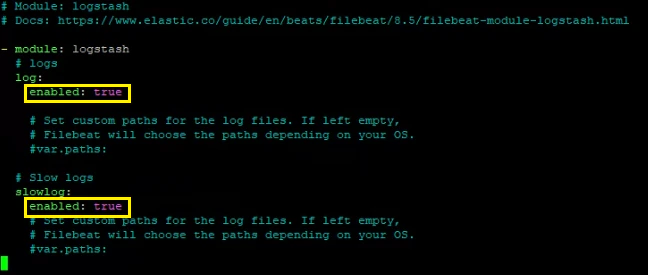 Important!! After a Filebeat module is enabled, the service needs to be restarted using the following command:
> Linux
```
sudo systemctl restart UTMStackModulesLogsCollector
```
> Windows
```
sc stop UTMStackModulesLogsCollector && timeout /t 5 && sc start UTMStackModulesLogsCollector
```
Depending on how you’ve installed Filebeat, you might see errors related to file ownership or permissions when you try to run Filebeat modules. See [Config File Ownership and Permissions](https://www.elastic.co/guide/en/beats/libbeat/8.5/config-file-permissions.html)
### 3. Click on the button shown below, to activate the UTMStack features related to this integration
Important!! After a Filebeat module is enabled, the service needs to be restarted using the following command:
> Linux
```
sudo systemctl restart UTMStackModulesLogsCollector
```
> Windows
```
sc stop UTMStackModulesLogsCollector && timeout /t 5 && sc start UTMStackModulesLogsCollector
```
Depending on how you’ve installed Filebeat, you might see errors related to file ownership or permissions when you try to run Filebeat modules. See [Config File Ownership and Permissions](https://www.elastic.co/guide/en/beats/libbeat/8.5/config-file-permissions.html)
### 3. Click on the button shown below, to activate the UTMStack features related to this integration