> ## Documentation Index
> Fetch the complete documentation index at: https://docs.insecureweb.com/llms.txt
> Use this file to discover all available pages before exploring further.
# Integration guide for MongoDB
> MongoDB is a document database used to build highly available and scalable internet applications.
This integration requires a UTMStack agent to work properly. Please, make sure you have installed it before you continue.
> MongoDB is a source-available cross-platform document-oriented database program. Classified as a NoSQL database program, MongoDB uses JSON-like documents with optional schemas. MongoDB is developed by MongoDB Inc. and licensed under the Server Side Public License (SSPL).
### 1. Enable Filebeat module
> Linux
```
cd /opt/utmstack-linux-agent/beats/filebeat/ && ./filebeat modules enable mongodb
```
> Windows
```
cd "C:\Program Files\UTMStack\UTMStack Agent\beats\filebeat\" && filebeat modules enable mongodb
```
### 2. Configure Filebeat module
> Configure the module configuration file according to the image below. You can find it in the path:
> Linux
```
/opt/utmstack-linux-agent/beats/filebeat/modules.d/mongodb.yml
```
> Windows
```
C:\Program Files\UTMStack\UTMStack Agent\beats\filebeat\modules.d\mongodb.yml
```
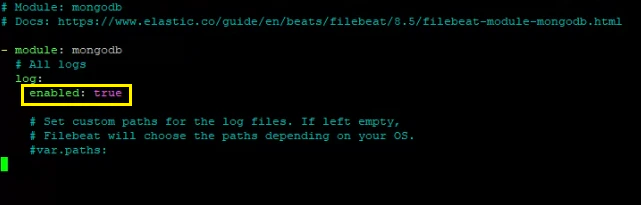 Important!! After a Filebeat module is enabled, the service needs to be restarted using the following command:
> Linux
```
sudo systemctl restart UTMStackModulesLogsCollector
```
> Windows
```
sc stop UTMStackModulesLogsCollector && timeout /t 5 && sc start UTMStackModulesLogsCollector
```
Depending on how you’ve installed Filebeat, you might see errors related to file ownership or permissions when you try to run Filebeat modules. See [Config File Ownership and Permissions](https://www.elastic.co/guide/en/beats/libbeat/8.5/config-file-permissions.html)
### 3. Click on the button shown below, to activate the UTMStack features related to this integration
Important!! After a Filebeat module is enabled, the service needs to be restarted using the following command:
> Linux
```
sudo systemctl restart UTMStackModulesLogsCollector
```
> Windows
```
sc stop UTMStackModulesLogsCollector && timeout /t 5 && sc start UTMStackModulesLogsCollector
```
Depending on how you’ve installed Filebeat, you might see errors related to file ownership or permissions when you try to run Filebeat modules. See [Config File Ownership and Permissions](https://www.elastic.co/guide/en/beats/libbeat/8.5/config-file-permissions.html)
### 3. Click on the button shown below, to activate the UTMStack features related to this integration